34. Django-Admin Integration
One of the goals of django-formset is to offer a flexible and easy to use library for manipulating formsets and to offer widgets with a way better usability than the builtin HTML form fields. During the development, the Django-Admin was an inspiration for many features of this library. Developers may recognize the similarities between the StackedInline- of the Django-Admin and the Form Collections of django-formset. The Dual Selector Widget is another such example, which the Django-Admin is referring to as filter horizontal.
34.1. Declaration over Configuration
The principal view class of the Django-Admin is the ModelAdmin. This class is responsible for converting a Django model into a form and optionally into extra fieldsets. It also provides a way to handle one level of related models, which are displayed as inlines. In a minimalistic configuration, a developer only needs to declare the model. However, this minimalism comes at a price because developers are bound by the constraints imposed by configuration options of that class.
django-formset provides an alternative class formset.admin.ModelAdmin to be used as a
replacement for Django’s ModelAdmin. This class requires just one mandatory attribute, either
form or collection_class. The form attribute must refer to an instance of a subclass of
formset.forms.ModelForm. The collection_class attribute must refer to an instance of a
subclass of formset.collection.CollectionForm. The attributes collection_class and
form are mutually exclusive and must not be used together on the same instance of a
ModelAdmin class.
The other attributes offered by Django’s ModelAdmin, have no effect if used with the
implementation of django-formset. Instead of using various configuration directives, a
declarative approach is used. This means that developers must create the structure of their forms
using the components provided by django-formset. The big advantage of this approach is that
such form-, fieldset- or collection declarations can also be used in normal Django views.
Here is a recipe on how to replace these configuration directives:
The fields attribute of the Django-Admin is used to configure the fields to be displayed in the
form. In django-formset this information is redundant, because the used form already declares
the wanted fields.
In django-formset, fieldsets are declared using the formset.fieldset.Fieldset class.
This allows developers to nest fieldsets and to reuse the same fieldset in multiple places. If
rendered in the Django-Admin, a <fieldset> uses the <legend> tag to display the fieldset
title. More on this can be found in section Fieldsets.
Adding a field name to the filter_horizontal attribute of the Django-Admin, renders a dual
listbox for that field. This is used to create a widget for a many-to-many relationship between two
models. django-formset provides a similar feature, with formset.widgets.DualSelector
and alternatively with formset.widgets.SelectizeMultiple. These widgets have to be
specified in the widget attribute of the form’s field classes. More on this can be found in
section Dual Selector Widget.
django-formset does not provide a vertical dual listbox. And sincerely, I never saw any implementation using it, nor do I see any need for such a widget.
By default, the Django-Admin creates a ModelForm dynamically for your model. With this directive
developers can specify a custom form class and override this behaviour. In django-formset, this
now is mandatory. So every instance of formset.admin.ModelAdmin must specify either a
form class or a collection_class.
ModelAdmin.formfield_overrides
This attribute is used to override the default form field or widget of a model field.
In django-formset, this is done by specifying the widget in the widget attribute of the
form’s field classes or by overriding the field in the class itself.
The Django-Admin provides a way to edit related models in a formset. This is done by using the
inlines attribute containing a list of subclasses of django.contrib.admin.TabularInline
or django.contrib.admin.StackedInline. In django-formset, this is done by using one or
more Form Collections. Since FormCollection-s can be nested deeply, they are rendered
using a surrounding border each, so that for the user it is clear which subform and field belongs to
which collection.
list_display and other related attributes
The list_display attribute of the Django-Admin is used by the list-view of a model. Its
behaviour remains unchanged in django-formset. The same applies to the attributes
list_display_links, list_editable, list_filter, list_max_show_all, list_per_page,
list_select_related, ordering, paginator and preserve_filters, search_fields,
search_help_text, show_full_result_count, sortable_by and view_on_site.
ModelAdmin.prepopulated_fields
The prepopulated_fields attribute of the Django-Admin is used to prepopulate a field with the
value of another field. This usually is used to generate the value for a slug field. In
django-formset, we can achieve the same effect by using the widget Slug Input Field on any
given text input field.
The radio_fields attribute of the Django-Admin is used to render a radio button for a
ChoiceField. In django-formset, this is done by using the widget
django.forms.widgets.`RadioSelect on the corresponding field. There, the orientation of the radio
buttons is determined by the attribute max_options_per_line used in the applied
Form Renderer.
ModelAdmin.autocomplete_fields
The autocomplete_fields attribute of the Django-Admin is used to render a Select2 widget for a
ForeignKey or ManyToManyField. In django-formset, this is done by using the widgets
Selectize Widget, Selectize Multiple Widget or Dual Selector Widget when declaring the field.
The raw_id_fields attribute of the Django-Admin is used to render a ForeignKey or
ManyToManyField as a text input field. In django-formset, there is no recommended equivalent
for this widget, but it can be implemented using a TextInput or NumberInput widget when declaring
the form field.
The readonly_fields attribute of the Django-Admin is used to specify a list of fields as
read-only. In django-formset, this is done by adding the given field names to the attribute
disabled_fields in the Meta option when declaring the form. More on this can be found in
section Extra Meta options.
The save_as attribute of the Django-Admin is used to display a button to save the current object
as a new one. This behaviour remains unchanged in django-formset.
The save_as_continue attribute of the Django-Admin is used in combination with save_as. If
both are true, after saving a new object the user is redirected to the list view for that model.
34.2. Example using a ModelForm
Every class inheriting from formset.forms.ModelForm compatible with any django-formset
aware view, can also be used in any class inheriting from formset.admin.ModelAdmin.
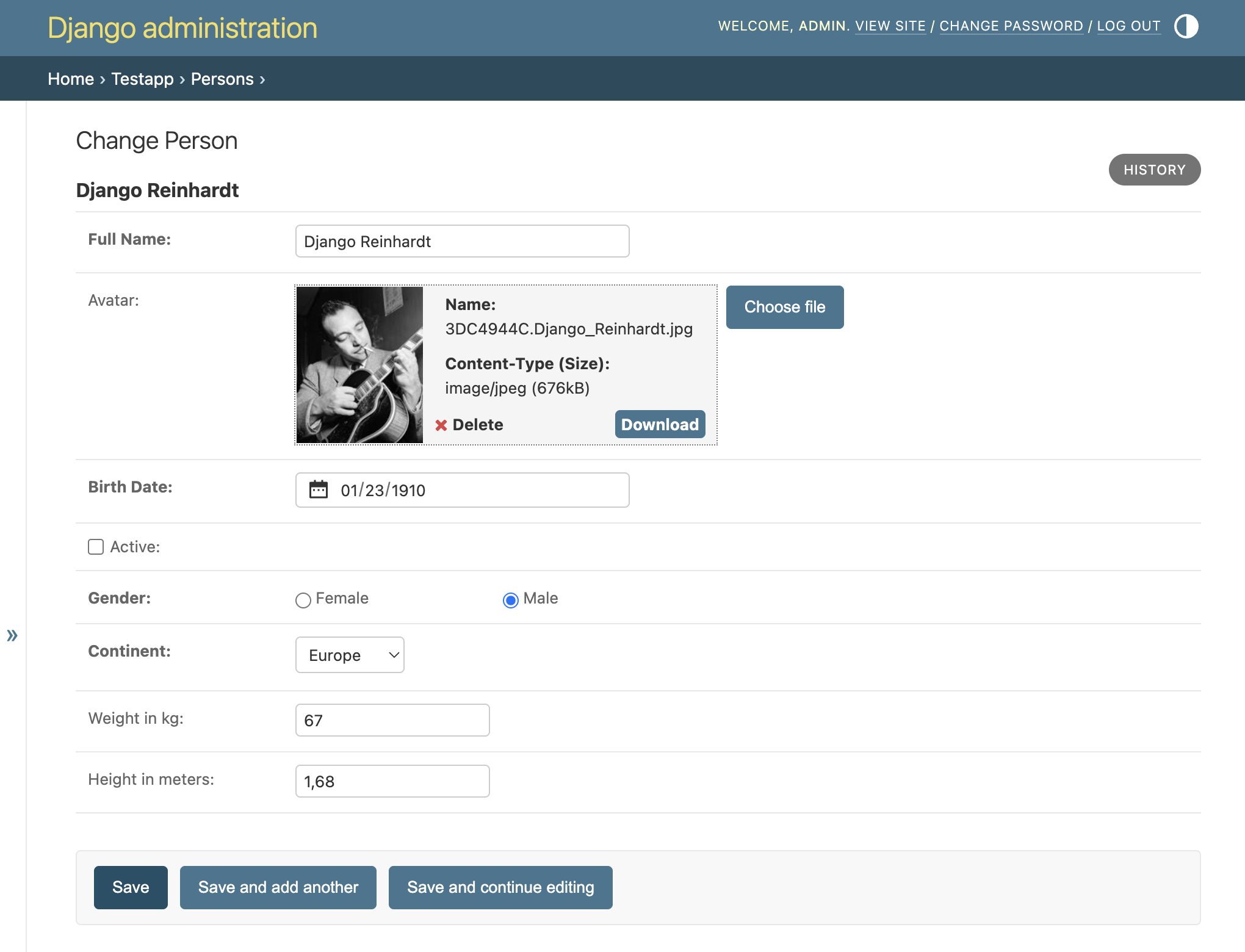
Say, we have a Django model to describe a person, with various fields for personal data including a
FileField to upload a picture for an avatar. The ModelForm to edit this model may look like
this:
     from django.forms.widgets import RadioSelect
     from formset.forms import ModelForm
     from formset.widgets import DatePicker, UploadedFileInput
     from .models import PersonModel

     class ModelPersonForm(ModelForm):
         class Meta:
             model = PersonModel
             fields = [
                 'full_name', 'avatar', 'birth_date', 'is_active',
                 'gender', 'continent', 'weight', 'height'
             ]
             widgets = {
                 'avatar': UploadedFileInput,
                 'gender': RadioSelect,
                 'birth_date': DatePicker,
             }
This ModelForm can be used directly in the Django Admin using a replacement for the Django
ModelAdmin class.
     from django.contrib import admin
     from formset.admin import ModelAdmin
     from .models import PersonModel
     from .forms import ModelPersonForm

     @admin.register(PersonModel)
     class PersonAdmin(ModelAdmin):
         form = ModelPersonForm
The editor rendered from this class will look like this:
34.3. Example using a FormCollection
Every class inheriting from formset.collection.FormCollection can also be used in any class
inheriting from formset.admin.ModelAdmin.
Say, we have a Django model to describe a company. Each department has a foreign key to model
Company and each team has a foreign key to model Department. A FormCollection to explain
this setup can be found in One-to-Many Relations. In django-formset this
collection of forms now can be used in the Django Admin:
     from django.contrib import admin
     from formset.admin import ModelAdmin
     from .models import Company
     from .collections import CompanyCollection

     @admin.register(Company)
     class CompanyAdmin(ModelAdmin):
         collection_class = CompanyCollection
         save_as = True
The editor rendered from this class will look like this:
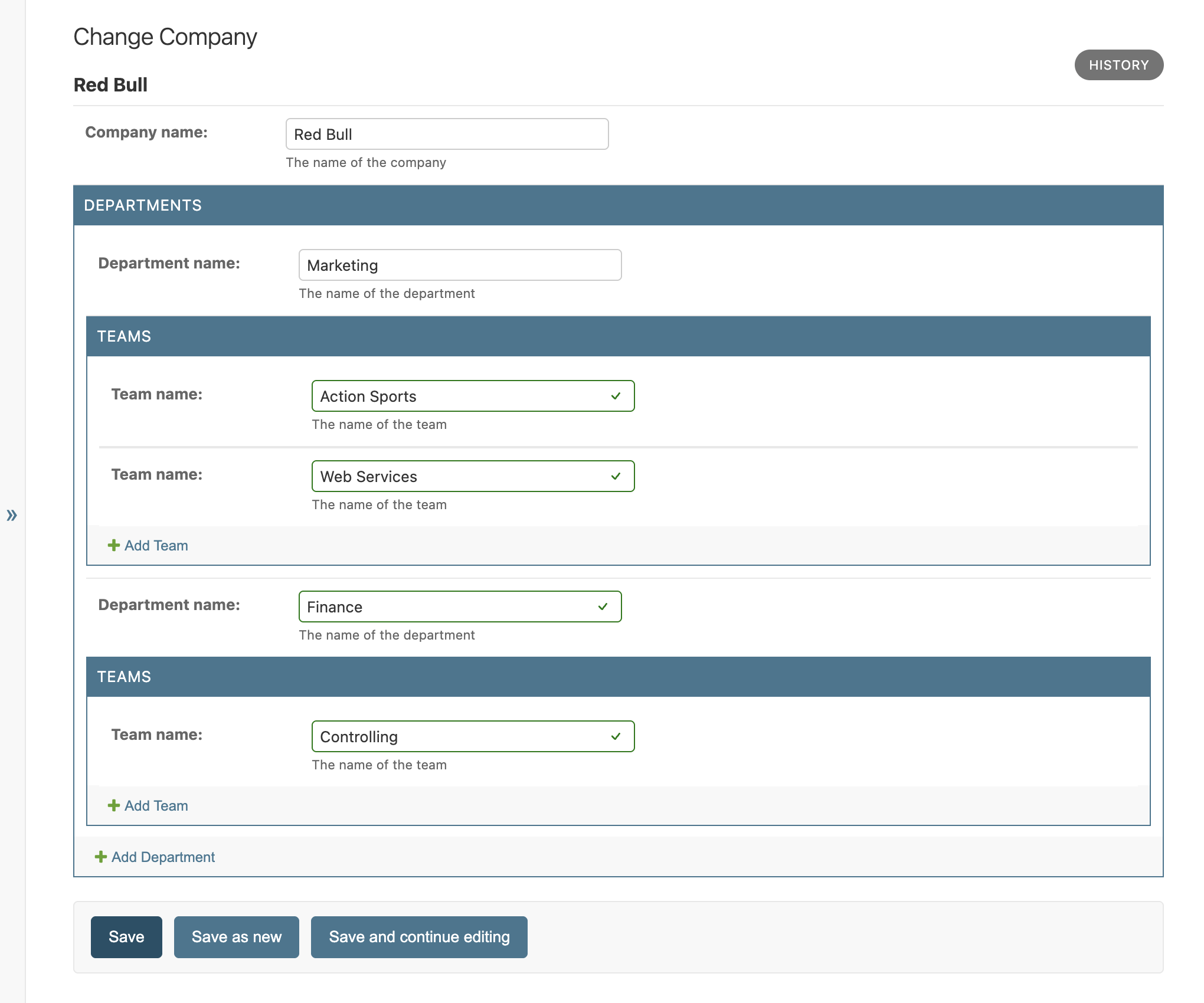
Some additional CSS has been added to this Django Admin to add borders around the given collections. This is to make the form collection more consistent with the logical structure of the model. Otherwise, the form collections would be rendered as a flat structure and this would make it hard to find out which teams belong to which department.
Note
The demo used to render these Django-Admin views is available when this testapp is started supporting the admin.